Installing the FAR Validator
System Requirements
The FAR Validator runs on Windows (Windows 10 or later). Contact us for MacOS versions. Alternatively, you can use the web version.
Step 1: Download the Installer
Step 2: Run the Installer
Double-click the downloaded
.exe file to launch the installer. If Windows SmartScreen prompts you, click More info then Run anyway to proceed. Note: Windows Defender or antivirus software may flag the file as untrusted. This is common for 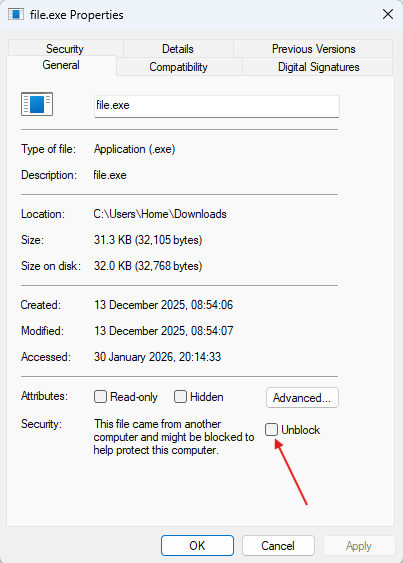
If the issue persists on a managed device, contact your IT administrator for assistance..exe files.To resolve: Right-click the file → Properties → Check Unblock→ Apply
Step 3: Follow the Setup Wizard
Follow the on-screen instructions to complete the installation. Accept the default installation directory or choose a custom path, then click Install.
Step 4: Activate Your License
Once installed, you can use the free version or activate your license to unlock premium features. If you do not have a license, visit the pricing page to learn more.
Updating the FAR Validator
To update to a newer version, download the latest installer and run it. The installer will automatically replace the existing installation while preserving your settings.